Note: All this data has been copied from various sources for the purpose of knowledge sharing. Data content can be either as it is or with little modification.
---------------------------------------------------------------------------------------------------------------------
Think about a table, say
For learning..
STEP 1:
CREATE TABLE Student(StudId smallint, StudName varchar(50), Class tinyint);
CREATE TABLE TotalMarks(StudentId smallint, TotalMarks smallint);
Go
STEP 2:
We will mark the
Clustered Index

Now let us assume that we had written a query like below:
Select * from student where studid = 103;
Select * from student where studid = 107;
Execution WITHOUT index --
First search will return data at Fourth comparison.
Second search will return data at 8th comparison.
Execution WITH index --
First search will return data at 1st comparison.
Second search will return data at 3rd comparison.
Non Clustered Index::
A non-clustered index is useful for columns that have some repeated values. Say for example,
---------------------------------------------------------------------------------------------------------------------
Think about a table, say
Customer (For any leading bank India), that has around 16 million records. When we try to retrieve records for two or three customers based on their customer id, all 16 million records are taken and comparison is made to get a match on the supplied customer ids. Think about how much time that will take if it is a web application and there are 25 to 30 customers that want to access their data through internet. Does the database server do 16 million x 30 searches? The answer is no because all modern databases use the concept of index.Index is a database object, which can be created on one or more columns (16 Max column combination). When creating the index will read the column(s) and forms a relevant data structure to minimize the number of data comparisons. The index will improve the performance of data retrieval and adds some overhead on data modification such as create, delete and modify. So it depends on how much data retrieval can be performed on table versus how much of DML (Insert, Delete and Update) operations.For learning..
STEP 1:
CREATE TABLE Student(StudId smallint, StudName varchar(50), Class tinyint);
CREATE TABLE TotalMarks(StudentId smallint, TotalMarks smallint);
Go
STEP 2:
We will mark the
StudId column of the Student table as primary key.Clustered Index
The primary key created for the
StudId column will create a clustered index for the Studid column. A table can have only one clustered index on it.
When creating the clustered index, SQL server 2005 reads the
Studid column and forms a Binary tree on it. This binary tree information is then stored separately in the disc. Expand the table Student and then expand the Indexes. You will see the following index created for you when the primary key is created:
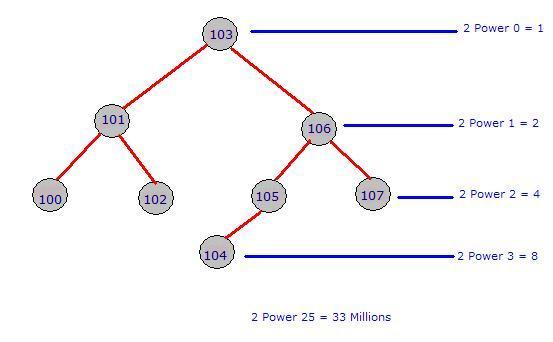
With the use of the binary tree, now the search for the student based on the
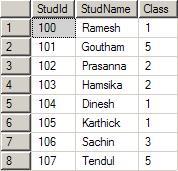
studid decreases the number of comparisons to a large amount. Let us assume that you had entered the following data in the table student:
The
index will form the below specified binary tree. Note that for a given parent, there are only one or two Childs. The left side will always have a lesser value and the right side will always have a greater value when compared to parent. The tree can be constructed in the reverse way also. That is, left side higher and right side lower.Now let us assume that we had written a query like below:
Select * from student where studid = 103;
Select * from student where studid = 107;
Execution WITHOUT index --
First search will return data at Fourth comparison.
Second search will return data at 8th comparison.
Execution WITH index --
First search will return data at 1st comparison.
Second search will return data at 3rd comparison.
Non Clustered Index::
A non-clustered index is useful for columns that have some repeated values. Say for example,
AccountType column of a bank database may have 10 million rows. But, the distinct values of account type may be 10-15. A clustered index is automatically created when we create the primary key for the table. We need to take care of the creation of the non-clustered index.
Follow the steps below to create a Non-clustered index on our table
Student based on the column class.- After expanding the
Studenttable, right click on theIndexes. And click on the New Index.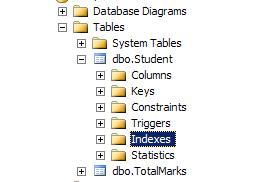
- From the displayed dialog, type the index name as shown below and then click on the Add button to select the column(s) that participate in the index. Make sure the
Indextype is Non-Clustered.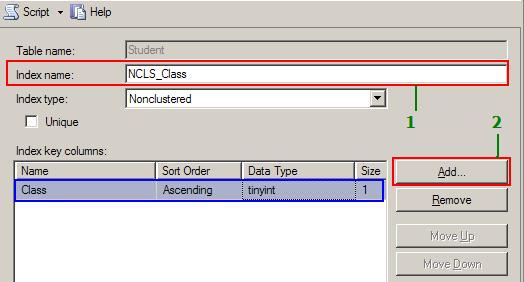
- In the select column dialog, place a check mark for the column class. This tells that we need a non-clustered index for the column
Student.Class. You can also combine more than one column to create theIndex. Once the column is selected, click on the OK button. You will return the dialog shown above with the selected column marked in blue. Our index has only one column. If you selected more than one column, using theMoveUpandMoveDownbutton, you can change order of the indexed columns. When you are using the combination of columns, always use the highly repeated column first and more unique columns down in the list. For example, let use assume the correct order for creating the Non-clustered index is:Class,DateOfBirth,PlaceOfBirth.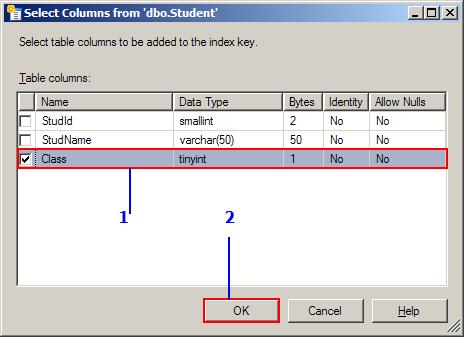
- Click on the Index folder on the right side and you will see the non-clustered index based on the column class is created for you.
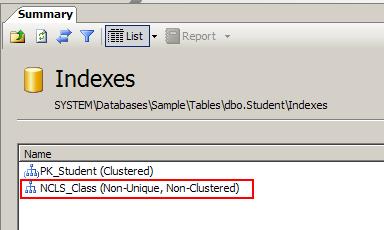
A table can have more than one Non-Clustered index. But, it should have only one clustered index that works based on the Binary tree concept. Non-Clustered column always depends on the Clustered column on the database.
=============================
A clustered index is a special type of index that reorders the way records in the table are physically stored. Therefore table can have only one clustered index. The leaf nodes of a clustered index contain the data pages. A nonclustered index is a special type of index in which the logical order of the index does not match the physical stored order of the rows on disk. The leaf node of a nonclustered index does not consist of the data pages. Instead, the leaf nodes contain index rows.
With a non clustered index there is a second list that has pointers to the physical rows. You can have many non clustered indexes, although each new index will increase the time it takes to write new records.
================================
=============================
A clustered index is a special type of index that reorders the way records in the table are physically stored. Therefore table can have only one clustered index. The leaf nodes of a clustered index contain the data pages. A nonclustered index is a special type of index in which the logical order of the index does not match the physical stored order of the rows on disk. The leaf node of a nonclustered index does not consist of the data pages. Instead, the leaf nodes contain index rows.
With a non clustered index there is a second list that has pointers to the physical rows. You can have many non clustered indexes, although each new index will increase the time it takes to write new records.
================================
Working of non-cluster index,
This can be easily explained with the concept of a book and its index page at the end. Let us assume that you are going to a bookshop and found a big 1500 pages of C# book that says all about C#. When you glanced at the book, it has all beautiful color pages and shiny papers. But, that is not only the eligibility for a good book right? One you are impressed, you want to see your favorite topic of Regular Expressions and how it is explained in the book. What will you do? I just peeped at you from behind and recorded what you did as below:
This can be easily explained with the concept of a book and its index page at the end. Let us assume that you are going to a bookshop and found a big 1500 pages of C# book that says all about C#. When you glanced at the book, it has all beautiful color pages and shiny papers. But, that is not only the eligibility for a good book right? One you are impressed, you want to see your favorite topic of Regular Expressions and how it is explained in the book. What will you do? I just peeped at you from behind and recorded what you did as below:
- You went to the Index page (it has total 25 pages). It is already sorted and hence you easily picked up Regular Expression that comes on page Number 17.
- Next, you noted down the number displayed next to it which is 407, 816, 1200-1220.
- Your first target is Page 407. You opened a page in the middle, the page is greater than 500.
- Then you moved to a somewhat lower page. But it still reads 310.
- Then you moved to a higher page. You are very lucky you exactly got page 407. [Yes man you got it. Otherwise I need to write more. OK?]
- That’s all, you started exploring what is written about Regular expression on that page, keeping in mind that you need to find page 816 also.
In the above scenario, the Index page is Non-Clustered index and the page numbers are clustered index arranged in a binary tree. See how you came to the page 407 very quickly. Your mind actually traversed the binary tree way left and right to reach the page 407 quickly.

No comments:
Post a Comment